First, let’s be real: those “free cruise” and “urgent package delivery” texts are the digital equivalent of a telemarketer calling you during dinner. They’re annoying, they’re pushy, and they smell like bad cologne. But don’t worry—you’ve got the power to silence them permanently.
We’re going to block these pests using your phone’s built-in tools and a little US Cellular magic. No rooting, no hex codes, and definitely no screaming into the void.
Method 1: The Classic “Block & Report” Smackdown
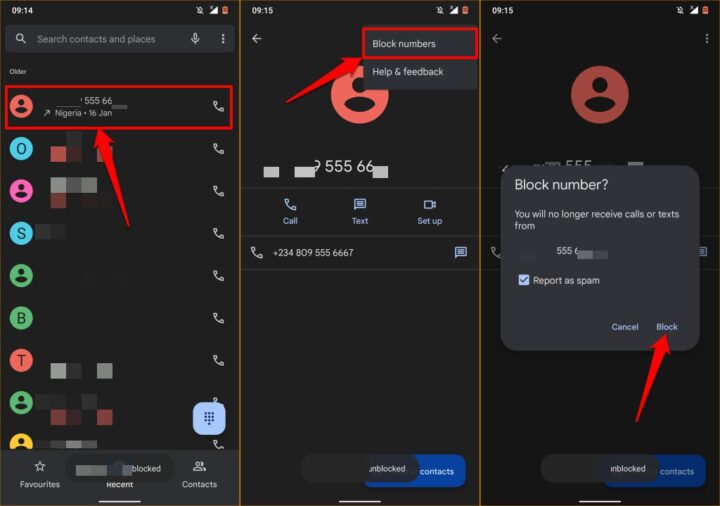
This is the easiest way, and it requires zero technical wizardry. Open the text from the scammer—yes, the one with the poorly Photoshopped check. Tap and hold on the message until a menu pops up, like a jack-in-the-box of frustration.
Look for the option that says “Block number” or “Block contact.” Tap it. Boom—that number is banished to the shadow realm. For extra satisfaction, also tap “Report as spam.” This helps US Cellular’s network know that the sender is a total menace.
Now, here’s a little secret: some Android phones call this “Block & Report.” Others call it “Block & Delete.” Either way, you’re basically flicking the annoying person off a cliff. Do it with a smile.
Method 2: The Google Messages Superpower
If you’re using the standard Google Messages app (the one with the blue icon), you’ve got a secret weapon. Open the app, tap the three dots in the top-right corner (the “options menu that’s shaped like a confused owl”), and go to Settings > Spam protection.
Flip the toggle to “Enable spam protection.” Now your phone will automatically try to detect spam texts and shove them into a separate folder. It’s like having a bouncer for your inbox who says, “Nope, not today, buddy.”
US Cellular also offers their own spam-blocking service. Call their customer service (yes, it’s 2026, but phone calls still exist) and ask about “Call Filter” or “Message Filter.” They can often block entire categories of junk texts at the network level.
 How to Block Texts on Android
Method 3: The Short Code Genocide
Some spam comes from “short codes”—those five-digit numbers that look like a robot sneezed. These are usually used by marketing companies who apparently never got the memo that nobody wants their “Deals of the Century!”.
To stop these, you can text “STOP” to the short code itself. It’s simple: just reply to the spam text with the word “STOP” in all caps. This works about 80% of the time, like a moody teenager finally doing their homework. If that doesn’t work, forward the text to 7726 (which spells “SPAM” on a phone keypad—clever, right?).
US Cellular will get the forwarded text and start blocking that number network-wide. It’s like you’re a vigilante bounty hunter, but without the cool leather jacket. You’re welcome, fellow humans.
Method 4: The Nuclear Option (Block All Unknown Numbers)
If you’re truly, deeply over it—like, you’ve had one too many “You won a free iPad” texts—you can block all texts from unknown senders. Go to Settings > Messages > Block unknown senders (or similar path, depending on your phone’s skin).
Be warned: this also blocks texts from that pizza place when they say your order is ready. And that one friend who’s always changing their number. So use this with caution. Maybe save it for a rainy day when you’re feeling extra spicy.
US Cellular also lets you turn on “Do Not Disturb” mode with custom rules. You can allow calls from your contacts but block all texters who aren’t in your address book. Ah, sweet, sweet silence.
 How to block text messages: Everything you need to know
Bonus Round: The “Just Don’t Engage” Rule
Here’s the best piece of advice, and it sounds too simple to be true: never reply to spam texts. Not with “STOP,” not with “Leave me alone,” and definitely not with angry emojis. Replying tells the scammer that your number is active, like ringing a dinner bell for more garbage.
Instead, just block and report. You are the ghost of their spam campaign—you vanish into the digital ether. Poof.
And hey, if you accidentally miss a text from your mom because you blocked everything, don’t panic. You can always unblock numbers in your settings. Mom will forgive you. Probably.

