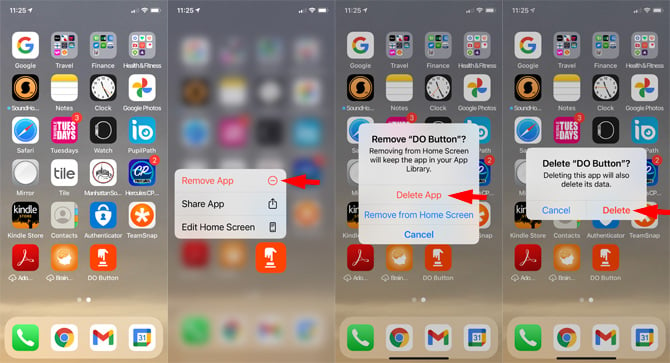
Go ahead. Tap that “X.” It feels so good. It’s instant gratification. The app will pop up a message: “Delete This App?” It’s like asking if you want to break up.
It will also say: “Deleting this app also deletes its data.” That means your high scores? Gone. Your saved memes? Gone. No take-backs. Make peace with your decision.
Tap “Delete.” Poof. The app disappears. The icon vanishes into thin digital air. The jiggling stops. Everything calms down. You are the master of your screen.
 How to Uninstall Apps from iPhone & iPad in Seconds - OS X Daily
The “Offload” Trick (Nerd Mode)
There’s a secret path for hoarders. It’s called “Offload App.” This is for people who can’t commit. Go to Settings > General > iPhone Storage.
Find the app you barely use, like that “Flashlight” app you downloaded before realizing your phone had one built in. Tap it. You’ll see an option: Offload App.
This deletes the app but keeps the documents and data. It’s like putting your clothes in storage while you move. The app’s ghost stays on your home screen. Spooky and practical.

